This page was automatically translated using the online service DeepL. The translation is intended to aid understanding and may contain language-specific inaccuracies. The official text is written in German. Any discrepancies or differences resulting solely from the translation are not legally binding. In case of doubt, the German version shall prevail. It is recommended to consult a qualified translator in case of doubt.

Social Project by the Trainees

A nectar bar for moths

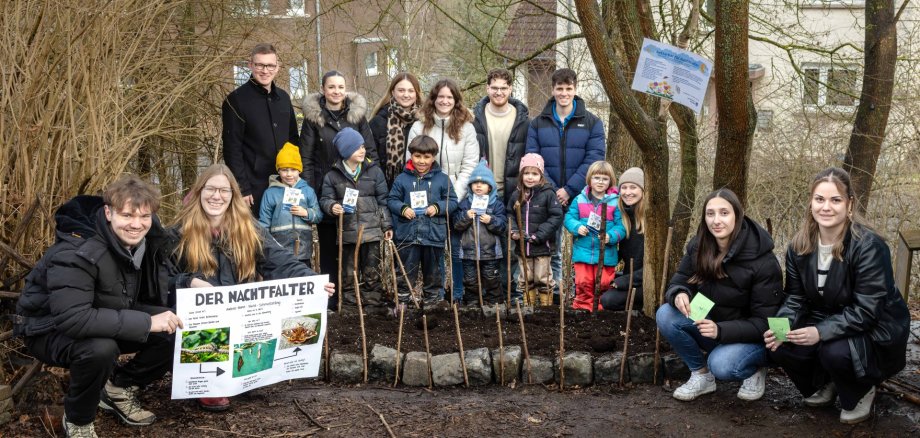
First, the trainees gave a child-friendly presentation during the morning circle time, explaining what a moth is, what a “nectar bar” is, and why it’s so important for moths. The children learned that moths make up a large portion of the local butterfly species and are urgently dependent on suitable food plants. Then it was time for hands-on learning: With great enthusiasm, the children shoveled soil into their little wheelbarrows, scattered seeds, and built a fence out of hazelnut branches. Through this hands-on activity, the young volunteers learned in a playful way which plants provide food for moths and their caterpillars and how important it is to create habitats for endangered species.

The result was a colorful flower bed that will provide food and shelter for many moths. The project combines vocational training and environmental education in a unique way: The apprentices were able to apply their knowledge in a practical way and take on responsibility, while the “garden kids” gained direct access to nature and actively contributed to species conservation themselves. Together, they sent a strong message in support of biodiversity and demonstrated how even small initiatives can have a big impact.

After the afternoon nap, the day came to a calm and creative close. The children had the opportunity to color mandalas featuring butterfly motifs, which helped them improve their concentration and fine motor skills. At the same time, a trainee read various stories aloud, which created a relaxed atmosphere for the children and encouraged them to enjoy listening. The children participated in both activities with great interest and enthusiasm.

Contact us

%count% items found in total.

Help with accessibility

  • General

    We endeavor to make our websites accessible. You can find details on this in our accessibility statement. You can send us suggestions for improvement via our feedback form Report accessibility.

  • Font size

    To adjust the font size, please use the following key combinations:

    Larger

    command
    +

    Smaller

    command

    Larger

    Ctrl
    +

    Smaller

    Ctrl
  • Keyboard navigation

    Use the TAB and SHIFT + TAB keys to navigate to the next or previous links, form fields, and buttons.

    Use the ENTER key to open links and interact with elements.

  • Contrast mode

    Press the following key combination to reduce or increase the contrast:

    Enlarge

    control
    option
    command
    .

    Decrease

    control
    option
    command
    ,
    Note: The shortcuts must be activated in the system settings of the operating system.

    Press the left ALT key + left SHIFT key + PRINT SCREEN to quickly turn high contrast mode on or off.

  • Invert colors

    Press the following key combination to switch the color inversion on and off:

    control
    option
    command
    8
    Note: The shortcuts must be activated in the system settings of the operating system.

    First activate the screen magnifier and then switch the color inversion on and off with the following key combinations:

    1. screen magnifier

    +

    2. invert colors

    Ctrl
    Old
    I
  • Screen magnifier

    Press the following key combinations to use the screen magnifier:

    Switch on/off

    option
    command
    8

    Enlarge view

    option
    command
    =

    Reduce view

    option
    command
    Note: The shortcuts must be activated in the system settings of the operating system.

    Switch on / Enlarge view

    +

    Reduce view