This page was automatically translated using the online service DeepL. The translation is intended to aid understanding and may contain language-specific inaccuracies. The official text is written in German. Any discrepancies or differences resulting solely from the translation are not legally binding. In case of doubt, the German version shall prevail. It is recommended to consult a qualified translator in case of doubt.

18 athletes are set to compete

C License: Three spots still available

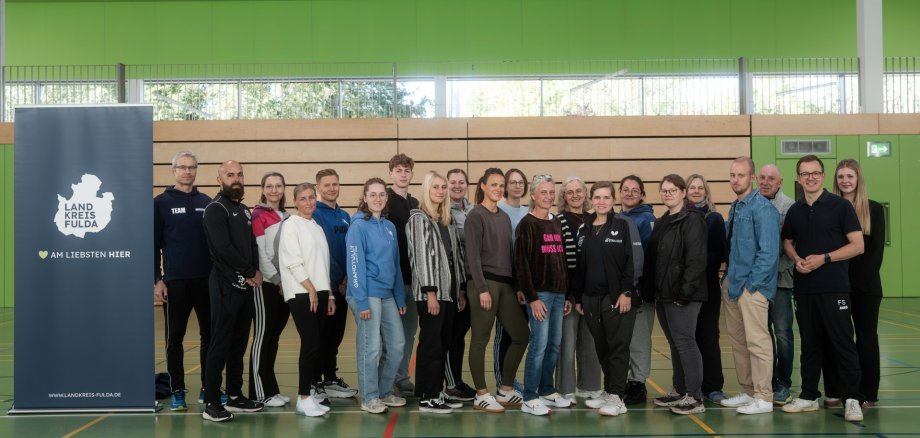
Twelve of the participants belong to clubs in the city of Fulda, and six are members of clubs in the Fulda district. The sports represented are quite diverse—ranging from soccer and gymnastics to canoeing and wrestling—as are the participants’ ages. This year, several young athletes are taking part; the youngest participant is 16 years old.

“We are delighted to have you on board as coaches for our clubs,” said First District Deputy Frederik Schmitt at the kickoff event in the Hofbieber District Sports Hall. “There is an urgent need for new coaches. That is why the Fulda District and the Fulda-Hünfeld Sports Association have been jointly supporting the C-license training course since 2022.”

Over the next few months, the athletes will be trained to lead recreational sports groups. Upon successful completion in April, they will receive their license from the German Olympic Sports Confederation. The training program is supervised by a team of instructors from Sportjugend Hessen. Thanks to the partnership between the district, the sports association, and Sportjugend Hessen—which has been in place since 2022—the training takes place at the Hofbieber District Sports Hall. The Fulda district is one of only two decentralized training centers of this kind in Hesse. Frederik Schmitt thanked the participating clubs, the teaching team, custodian Christian Brehl for his on-site support, and sports coordinator Lars Löbel for his organizational assistance.

There are still three spots available in the course. It’s still possible to join even now, after the first session. The course continues on Saturday, October 31. An overview of all dates, information on participation requirements, and the registration form are available online. If you have any questions, please contact Emily Fischer, the association and funding advisor.


Contact us

No departments found.


Help with accessibility

  • General

    We endeavor to make our websites accessible. You can find details on this in our accessibility statement. You can send us suggestions for improvement via our feedback form Report accessibility.

  • Font size

    To adjust the font size, please use the following key combinations:

    Larger

    ⌘command
    +

    Smaller

    ⌘command
    –

    Larger

    Ctrl
    +

    Smaller

    Ctrl
    –
  • Keyboard navigation

    Use the TAB and SHIFT + TAB keys to navigate to the next or previous links, form fields, and buttons.

    Use the ENTER key to open links and interact with elements.

  • Contrast mode

    Press the following key combination to reduce or increase the contrast:

    Enlarge

    ⌃control
    ⌥option
    ⌘command
    .

    Decrease

    ⌃control
    ⌥option
    ⌘command
    ,
    Note: The shortcuts must be activated in the system settings of the operating system.

    Press the left ALT key + left SHIFT key + PRINT SCREEN to quickly turn high contrast mode on or off.

  • Invert colors

    Press the following key combination to switch the color inversion on and off:

    ⌃control
    ⌥option
    ⌘command
    8
    Note: The shortcuts must be activated in the system settings of the operating system.

    First activate the screen magnifier and then switch the color inversion on and off with the following key combinations:

    1. screen magnifier

    +

    2. invert colors

    Ctrl
    Old
    I
  • Screen magnifier

    Press the following key combinations to use the screen magnifier:

    Switch on/off

    ⌥option
    ⌘command
    8

    Enlarge view

    ⌥option
    ⌘command
    =

    Reduce view

    ⌥option
    ⌘command
    –
    Note: The shortcuts must be activated in the system settings of the operating system.

    Switch on / Enlarge view

    +

    Reduce view

    –