This page was automatically translated using the online service DeepL. The translation is intended to aid understanding and may contain language-specific inaccuracies. The official text is written in German. Any discrepancies or differences resulting solely from the translation are not legally binding. In case of doubt, the German version shall prevail. It is recommended to consult a qualified translator in case of doubt.

Fulda County Installs a Network of Cycling Interchanges

3,300 plaques, 60 large and 200 small information signs will be installed

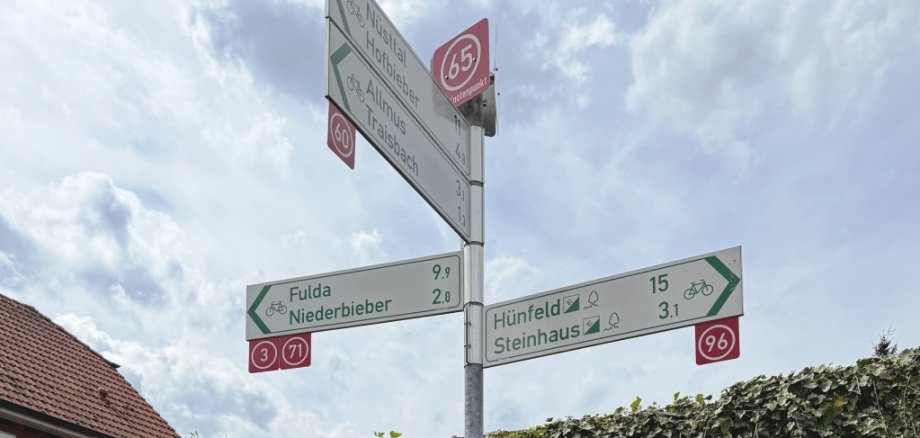
The junction system makes it possible to “cycle by numbers” in the Fulda district. It is used, for example, in the Netherlands, Belgium, and other tourist regions, and makes it easier to plan bike tours.

The junction signage ensures that routes can be planned flexibly and easily, even without local knowledge. Each junction is identified by a number, which is displayed above the signposts in the form of a so-called “junction cap.” In addition, cyclists will find an information board at each of these 260 points featuring a map that shows either the entire bike path network or the immediate surroundings.

To plan your route, simply write down the numbers you want in the correct order—and then you can cycle from number to number. Small signs below the directional signs indicate the direction to the next number.

The installation of the approximately 3,300 plaques beneath the signposts and the 260 junction markers on the posts is nearly complete. By early fall, about 60 large-format signs and approximately 200 smaller signs will be added to help with on-site navigation.

“The contractor still has a lot of work ahead of it. Two foundations need to be poured for the large signs so they can be securely installed. This work alone will take more than four weeks,” explains Christian Hillenbrand, local mobility coordinator for the Fulda district.

In addition, the Fulda District asks for your understanding if traffic disruptions occur during the installation.

The project is being carried out in collaboration with the cities and municipalities and is funded by the State of Hesse.

Contact us

No departments found.

Help with accessibility

  • General

    We endeavor to make our websites accessible. You can find details on this in our accessibility statement. You can send us suggestions for improvement via our feedback form Report accessibility.

  • Font size

    To adjust the font size, please use the following key combinations:

    Larger

    command
    +

    Smaller

    command

    Larger

    Ctrl
    +

    Smaller

    Ctrl
  • Keyboard navigation

    Use the TAB and SHIFT + TAB keys to navigate to the next or previous links, form fields, and buttons.

    Use the ENTER key to open links and interact with elements.

  • Contrast mode

    Press the following key combination to reduce or increase the contrast:

    Enlarge

    control
    option
    command
    .

    Decrease

    control
    option
    command
    ,
    Note: The shortcuts must be activated in the system settings of the operating system.

    Press the left ALT key + left SHIFT key + PRINT SCREEN to quickly turn high contrast mode on or off.

  • Invert colors

    Press the following key combination to switch the color inversion on and off:

    control
    option
    command
    8
    Note: The shortcuts must be activated in the system settings of the operating system.

    First activate the screen magnifier and then switch the color inversion on and off with the following key combinations:

    1. screen magnifier

    +

    2. invert colors

    Ctrl
    Old
    I
  • Screen magnifier

    Press the following key combinations to use the screen magnifier:

    Switch on/off

    option
    command
    8

    Enlarge view

    option
    command
    =

    Reduce view

    option
    command
    Note: The shortcuts must be activated in the system settings of the operating system.

    Switch on / Enlarge view

    +

    Reduce view